

Flutter for OpenHarmony 跨平台开发:记事本功能实战指南
欢迎加入开源鸿蒙跨平台社区:https://openharmonycrossplatform.csdn.net
一、引言
记事本是移动设备中最基础且常用的应用之一,其开发涉及数据存储、列表展示、搜索过滤、状态管理等多个技术领域。随着鸿蒙生态的快速发展,如何高效地实现跨平台记事本应用,成为开发者关注的技术要点。
Flutter作为Google推出的开源UI框架,凭借其跨平台能力和丰富的组件生态,为记事本功能的实现提供了便捷的技术方案。Flutter for OpenHarmony的出现,使得Flutter开发者能够将应用部署到鸿蒙设备,进一步拓展了跨平台开发的应用范围。
本文将以记事本功能为例,详细介绍如何使用Flutter for OpenHarmony实现笔记的增删改查、搜索过滤、排序、置顶等功能,为开发者提供完整的技术参考。
二、技术背景
2.1 Flutter for OpenHarmony概述
Flutter是Google于2017年发布的开源UI框架,采用Dart语言进行开发。Flutter通过Skia渲染引擎实现自绘,不依赖平台原生组件,从而保证了不同平台上UI的一致性。
OpenHarmony是由开放原子开源基金会孵化的开源操作系统项目,旨在构建万物智联的操作系统生态。Flutter for OpenHarmony是Flutter在OpenHarmony平台上的适配实现,使Flutter开发者能够将应用无缝部署到鸿蒙设备。
2.2 记事本的技术架构
实现记事本功能涉及以下核心技术:
数据管理:使用List存储笔记数据,Map结构存储单条笔记的各个属性。
搜索过滤:实现标题和内容的模糊搜索,支持实时过滤。
排序功能:支持按时间、按标题等多种排序方式。
状态管理:使用setState管理笔记列表、搜索条件、排序方式等状态。
2.3 Flutter与原生鸿蒙开发的对比
| 对比维度 | Flutter for OpenHarmony | 原生鸿蒙开发(ArkTS) |
|---|---|---|
| 编程语言 | Dart | ArkTS |
| 列表组件 | ListView功能完善 | List组件需适配 |
| 搜索实现 | 简洁高效 | 需要手动实现 |
| 跨平台能力 | 支持多平台 | 仅限鸿蒙平台 |
| 开发效率 | 热重载支持 | 需要重新编译 |
三、功能设计
3.1 需求分析
记事本功能的核心需求包括:
- 笔记管理:支持创建、编辑、删除笔记
- 搜索功能:支持按标题和内容搜索笔记
- 排序功能:支持按时间、按标题排序
- 置顶功能:支持将重要笔记置顶显示
- 颜色标记:支持为笔记选择不同颜色
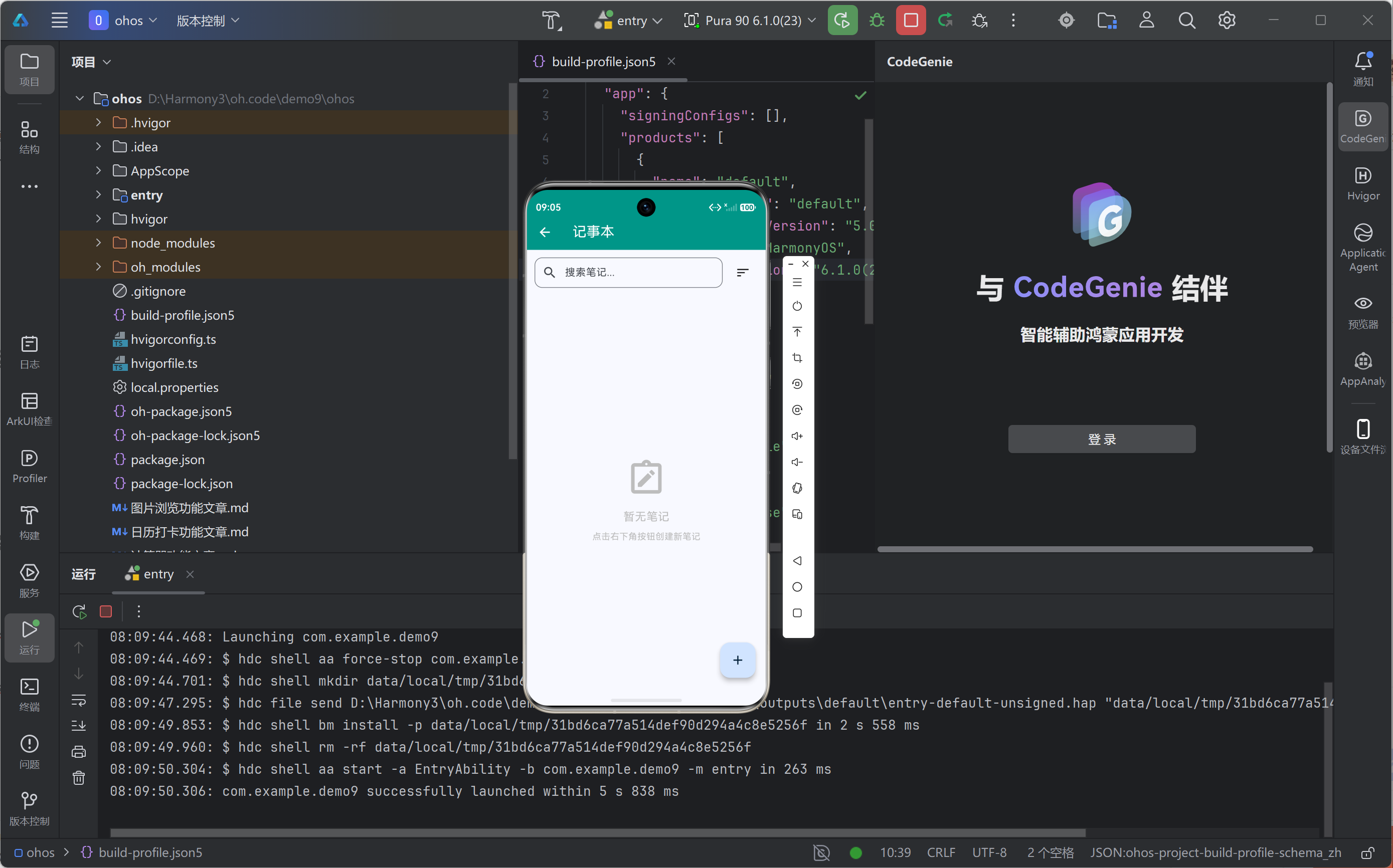
- 空状态展示:无笔记时显示引导信息
3.2 数据结构设计
每条笔记采用Map结构存储,包含以下字段:
{
  'id': int,           // 唯一标识
  'title': String,     // 标题
  'content': String,   // 内容
  'date': DateTime,    // 创建/修改时间
  'color': int,        // 颜色索引
  'isPinned': bool,    // 是否置顶
}
3.3 界面设计
界面分为以下几个部分:
搜索栏:包含搜索输入框和排序按钮
笔记列表:展示所有笔记卡片,置顶笔记优先显示
浮动按钮:点击创建新笔记
编辑弹窗:底部弹出的笔记编辑界面
四、核心实现
4.1 状态变量定义
使用以下状态变量管理记事本状态:
// 笔记列表
final List<Map<String, dynamic>> _notes = [];

// 标题输入控制器
final TextEditingController _titleController = TextEditingController();

// 内容输入控制器
final TextEditingController _contentController = TextEditingController();

// 选中的颜色索引
int _selectedColorIndex = 0;

// 搜索关键词
String _searchQuery = '';

// 排序方式
String _sortBy = 'date';

// 可选颜色列表
final List<Color> _colors = [
  Colors.yellow.shade100,
  Colors.green.shade100,
  Colors.blue.shade100,
  Colors.pink.shade100,
  Colors.purple.shade100,
  Colors.orange.shade100,
];
4.2 搜索与排序实现
搜索和排序的过滤逻辑:
List<Map<String, dynamic>> get _filteredNotes {
  // 按搜索关键词过滤
  var notes = _notes.where((n) =>
      n['title'].toString().toLowerCase().contains(_searchQuery.toLowerCase()) ||
      n['content'].toString().toLowerCase().contains(_searchQuery.toLowerCase())
  ).toList();

  // 排序
  if (_sortBy == 'date') {
    notes.sort((a, b) => (b['date'] as DateTime).compareTo(a['date'] as DateTime));
  } else if (_sortBy == 'title') {
    notes.sort((a, b) => a['title'].toString().compareTo(b['title'].toString()));
  }

  return notes;
}
4.3 添加笔记
添加新笔记的实现:
void _addNote() {
  // 验证输入
  if (_titleController.text.trim().isEmpty &&
      _contentController.text.trim().isEmpty) return;

  setState(() {
    _notes.insert(0, {
      'id': DateTime.now().millisecondsSinceEpoch,
      'title': _titleController.text.isEmpty
          ? '无标题'
          : _titleController.text,
      'content': _contentController.text,
      'date': DateTime.now(),
      'color': _selectedColorIndex,
      'isPinned': false,
    });
    // 清空输入
    _titleController.clear();
    _contentController.clear();
    _selectedColorIndex = 0;
  });
  Navigator.pop(context);
}
4.4 编辑笔记
编辑已有笔记的实现:
void _editNote(int index) {
  final note = _notes[index];
  // 填充现有内容
  _titleController.text = note['title'];
  _contentController.text = note['content'];
  _selectedColorIndex = note['color'];

  // 显示编辑弹窗
  showModalBottomSheet(
    context: context,
    isScrollControlled: true,
    builder: (context) => _buildNoteEditor(isEdit: true, editIndex: index),
  );
}

void _updateNote(int index) {
  setState(() {
    _notes[index]['title'] = _titleController.text.isEmpty
        ? '无标题'
        : _titleController.text;
    _notes[index]['content'] = _contentController.text;
    _notes[index]['color'] = _selectedColorIndex;
    _notes[index]['date'] = DateTime.now();
  });
  _titleController.clear();
  _contentController.clear();
  Navigator.pop(context);
}
4.5 删除笔记
删除笔记的实现,包含确认对话框:
void _deleteNote(int index) {
  showDialog(
    context: context,
    builder: (context) => AlertDialog(
      title: const Text('删除笔记'),
      content: const Text('确定要删除这条笔记吗?'),
      actions: [
        TextButton(
          onPressed: () => Navigator.pop(context),
          child: const Text('取消')
        ),
        TextButton(
          onPressed: () {
            setState(() => _notes.removeAt(index));
            Navigator.pop(context);
          },
          child: const Text('删除', style: TextStyle(color: Colors.red)),
        ),
      ],
    ),
  );
}
4.6 置顶功能
置顶笔记的实现:
void _togglePin(int index) {
  setState(() {
    _notes[index]['isPinned'] = !_notes[index]['isPinned'];
  });
}
五、完整代码实现
import 'package:flutter/material.dart';
class NotesFeature extends StatefulWidget {
const NotesFeature({super.key});
State<NotesFeature> createState() => _NotesFeatureState();
}
class _NotesFeatureState extends State<NotesFeature> {
final List<Map<String, dynamic>> _notes = [];
final TextEditingController _titleController = TextEditingController();
final TextEditingController _contentController = TextEditingController();
int _selectedColorIndex = 0;
String _searchQuery = '';
String _sortBy = 'date';
final List<Color> _colors = [
Colors.yellow.shade100,
Colors.green.shade100,
Colors.blue.shade100,
Colors.pink.shade100,
Colors.purple.shade100,
Colors.orange.shade100,
];
List<Map<String, dynamic>> get _filteredNotes {
var notes = _notes.where((n) =>
n['title'].toString().toLowerCase().contains(_searchQuery.toLowerCase()) ||
n['content'].toString().toLowerCase().contains(_searchQuery.toLowerCase())
).toList();
if (_sortBy == 'date') {
notes.sort((a, b) => (b['date'] as DateTime).compareTo(a['date'] as DateTime));
} else if (_sortBy == 'title') {
notes.sort((a, b) => a['title'].toString().compareTo(b['title'].toString()));
}
return notes;
}
void _addNote() {
if (_titleController.text.trim().isEmpty && _contentController.text.trim().isEmpty) return;
setState(() {
_notes.insert(0, {
'id': DateTime.now().millisecondsSinceEpoch,
'title': _titleController.text.isEmpty ? '无标题' : _titleController.text,
'content': _contentController.text,
'date': DateTime.now(),
'color': _selectedColorIndex,
'isPinned': false,
});
_titleController.clear();
_contentController.clear();
_selectedColorIndex = 0;
});
Navigator.pop(context);
}
void _editNote(int index) {
final note = _notes[index];
_titleController.text = note['title'];
_contentController.text = note['content'];
_selectedColorIndex = note['color'];
showModalBottomSheet(
context: context,
isScrollControlled: true,
builder: (context) => _buildNoteEditor(isEdit: true, editIndex: index),
);
}
void _updateNote(int index) {
setState(() {
_notes[index]['title'] = _titleController.text.isEmpty ? '无标题' : _titleController.text;
_notes[index]['content'] = _contentController.text;
_notes[index]['color'] = _selectedColorIndex;
_notes[index]['date'] = DateTime.now();
});
_titleController.clear();
_contentController.clear();
Navigator.pop(context);
}
void _deleteNote(int index) {
showDialog(
context: context,
builder: (context) => AlertDialog(
title: const Text('删除笔记'),
content: const Text('确定要删除这条笔记吗?'),
actions: [
TextButton(onPressed: () => Navigator.pop(context), child: const Text('取消')),
TextButton(
onPressed: () {
setState(() => _notes.removeAt(index));
Navigator.pop(context);
},
child: const Text('删除', style: TextStyle(color: Colors.red)),
),
],
),
);
}
void _togglePin(int index) {
setState(() {
_notes[index]['isPinned'] = !_notes[index]['isPinned'];
});
}
Widget build(BuildContext context) {
return Scaffold(
body: Column(
children: [
_buildSearchBar(),
Expanded(
child: _filteredNotes.isEmpty ? _buildEmptyState() : _buildNotesList(),
),
],
),
floatingActionButton: FloatingActionButton(
onPressed: () {
_titleController.clear();
_contentController.clear();
_selectedColorIndex = 0;
showModalBottomSheet(
context: context,
isScrollControlled: true,
builder: (context) => _buildNoteEditor(),
);
},
child: const Icon(Icons.add),
),
);
}
Widget _buildSearchBar() {
return Container(
padding: const EdgeInsets.all(12),
child: Row(
children: [
Expanded(
child: TextField(
onChanged: (v) => setState(() => _searchQuery = v),
decoration: InputDecoration(
hintText: '搜索笔记...',
prefixIcon: const Icon(Icons.search),
border: OutlineInputBorder(borderRadius: BorderRadius.circular(12)),
contentPadding: const EdgeInsets.symmetric(horizontal: 12),
),
),
),
const SizedBox(width: 8),
PopupMenuButton<String>(
icon: const Icon(Icons.sort),
onSelected: (v) => setState(() => _sortBy = v),
itemBuilder: (context) => [
const PopupMenuItem(value: 'date', child: Text('按时间排序')),
const PopupMenuItem(value: 'title', child: Text('按标题排序')),
],
),
],
),
);
}
Widget _buildEmptyState() {
return Center(
child: Column(
mainAxisAlignment: MainAxisAlignment.center,
children: [
Icon(Icons.note_alt_outlined, size: 64, color: Colors.grey.shade400),
const SizedBox(height: 16),
Text('暂无笔记', style: TextStyle(fontSize: 18, color: Colors.grey.shade400)),
const SizedBox(height: 8),
Text('点击右下角按钮创建新笔记', style: TextStyle(fontSize: 14, color: Colors.grey.shade400)),
],
),
);
}
Widget _buildNotesList() {
final pinnedNotes = _filteredNotes.where((n) => n['isPinned']).toList();
final otherNotes = _filteredNotes.where((n) => !n['isPinned']).toList();
return ListView(
padding: const EdgeInsets.all(12),
children: [
if (pinnedNotes.isNotEmpty) ...[
const Padding(
padding: EdgeInsets.symmetric(vertical: 8),
child: Text('已置顶', style: TextStyle(fontWeight: FontWeight.bold, color: Colors.grey)),
),
...pinnedNotes.map((note) => _buildNoteCard(_notes.indexOf(note), note)),
],
if (otherNotes.isNotEmpty) ...[
if (pinnedNotes.isNotEmpty)
const Padding(
padding: EdgeInsets.symmetric(vertical: 8),
child: Text('其他', style: TextStyle(fontWeight: FontWeight.bold, color: Colors.grey)),
),
...otherNotes.map((note) => _buildNoteCard(_notes.indexOf(note), note)),
],
],
);
}
Widget _buildNoteCard(int index, Map<String, dynamic> note) {
return Card(
margin: const EdgeInsets.only(bottom: 8),
color: _colors[note['color']],
child: InkWell(
onTap: () => _editNote(index),
borderRadius: BorderRadius.circular(12),
child: Padding(
padding: const EdgeInsets.all(16),
child: Column(
crossAxisAlignment: CrossAxisAlignment.start,
children: [
Row(
children: [
Expanded(
child: Text(
note['title'],
style: const TextStyle(fontSize: 16, fontWeight: FontWeight.bold),
),
),
if (note['isPinned'])
const Icon(Icons.push_pin, size: 16, color: Colors.grey),
],
),
const SizedBox(height: 8),
Text(
note['content'],
style: const TextStyle(fontSize: 14),
maxLines: 3,
overflow: TextOverflow.ellipsis,
),
const SizedBox(height: 8),
Row(
mainAxisAlignment: MainAxisAlignment.spaceBetween,
children: [
Text(
_formatDate(note['date']),
style: const TextStyle(fontSize: 12, color: Colors.grey),
),
Row(
mainAxisSize: MainAxisSize.min,
children: [
IconButton(
icon: Icon(note['isPinned'] ? Icons.push_pin : Icons.push_pin_outlined, size: 20),
onPressed: () => _togglePin(index),
padding: EdgeInsets.zero,
constraints: const BoxConstraints(),
),
const SizedBox(width: 8),
IconButton(
icon: const Icon(Icons.delete_outline, size: 20, color: Colors.red),
onPressed: () => _deleteNote(index),
padding: EdgeInsets.zero,
constraints: const BoxConstraints(),
),
],
),
],
),
],
),
),
),
);
}
Widget _buildNoteEditor({bool isEdit = false, int? editIndex}) {
return Padding(
padding: EdgeInsets.only(
bottom: MediaQuery.of(context).viewInsets.bottom,
left: 16,
right: 16,
top: 16,
),
child: SingleChildScrollView(
child: Column(
mainAxisSize: MainAxisSize.min,
crossAxisAlignment: CrossAxisAlignment.stretch,
children: [
Text(
isEdit ? '编辑笔记' : '新建笔记',
style: const TextStyle(fontSize: 18, fontWeight: FontWeight.bold),
),
const SizedBox(height: 16),
TextField(
controller: _titleController,
decoration: const InputDecoration(
hintText: '标题',
border: OutlineInputBorder(),
),
style: const TextStyle(fontSize: 18, fontWeight: FontWeight.bold),
),
const SizedBox(height: 12),
TextField(
controller: _contentController,
decoration: const InputDecoration(
hintText: '内容',
border: OutlineInputBorder(),
),
maxLines: 6,
),
const SizedBox(height: 12),
const Text('选择颜色:', style: TextStyle(fontSize: 14)),
const SizedBox(height: 8),
Wrap(
spacing: 8,
children: List.generate(_colors.length, (index) => GestureDetector(
onTap: () => setState(() => _selectedColorIndex = index),
child: Container(
width: 36,
height: 36,
decoration: BoxDecoration(
color: _colors[index],
shape: BoxShape.circle,
border: _selectedColorIndex == index
? Border.all(color: Colors.black, width: 2)
: null,
),
child: _selectedColorIndex == index
? const Icon(Icons.check, size: 20)
: null,
),
)),
),
const SizedBox(height: 16),
ElevatedButton(
onPressed: isEdit ? () => _updateNote(editIndex!) : _addNote,
style: ElevatedButton.styleFrom(padding: const EdgeInsets.symmetric(vertical: 12)),
child: Text(isEdit ? '保存' : '创建'),
),
const SizedBox(height: 16),
],
),
),
);
}
String _formatDate(DateTime date) {
return '${date.year}/${date.month}/${date.day} ${date.hour}:${date.minute.toString().padLeft(2, '0')}';
}
}
六、运行效果
七、关键技术点解析
7.1 ListView与笔记列表
Flutter的ListView组件非常适合构建笔记列表:
ListView(
  padding: const EdgeInsets.all(12),
  children: [
    // 置顶笔记区域
    if (pinnedNotes.isNotEmpty) ...[
      const Text('已置顶'),
      ...pinnedNotes.map((note) => _buildNoteCard(note)),
    ],
    // 其他笔记区域
    if (otherNotes.isNotEmpty) ...[
      const Text('其他'),
      ...otherNotes.map((note) => _buildNoteCard(note)),
    ],
  ],
)
通过将置顶笔记和其他笔记分开处理,实现了置顶优先显示的效果。
7.2 showModalBottomSheet编辑弹窗
使用showModalBottomSheet实现底部弹出的编辑界面:
showModalBottomSheet(
  context: context,
  isScrollControlled: true,  // 允许弹窗高度自适应
  builder: (context) => _buildNoteEditor(),
);
设置isScrollControlled为true,可以让弹窗根据内容自适应高度,配合MediaQuery.of(context).viewInsets.bottom处理键盘弹出时的布局。
7.3 TextEditingController输入控制
TextEditingController用于控制输入框的内容:
final TextEditingController _titleController = TextEditingController();

// 设置内容
_titleController.text = note['title'];

// 清空内容
_titleController.clear();

// 获取内容
String title = _titleController.text;
7.4 PopupMenuButton排序菜单
PopupMenuButton用于实现排序选项菜单:
PopupMenuButton<String>(
  icon: const Icon(Icons.sort),
  onSelected: (v) => setState(() => _sortBy = v),
  itemBuilder: (context) => [
    const PopupMenuItem(value: 'date', child: Text('按时间排序')),
    const PopupMenuItem(value: 'title', child: Text('按标题排序')),
  ],
)
7.5 OpenHarmony平台适配要点
在OpenHarmony设备上运行Flutter应用,需要注意:
- 签名配置:需要在DevEco Studio中配置应用签名
- 数据持久化:本示例使用内存存储,实际应用需集成shared_preferences或hive
- 触摸交互:使用InkWell和IconButton处理触摸事件
八、总结与展望
本文详细介绍了使用Flutter for OpenHarmony开发记事本功能的完整过程。通过合理的数据结构设计、清晰的增删改查逻辑、规范的UI组件构建,实现了一个功能完善、交互友好的记事本模块。
技术要点回顾:
- 使用List
- 使用TextEditingController控制输入
- 使用showModalBottomSheet实现编辑弹窗
- 使用PopupMenuButton实现排序菜单
- 实现搜索过滤和置顶功能
扩展方向:
- 数据持久化:集成shared_preferences或hive实现数据本地存储
- 分类功能:支持笔记分类管理
- 富文本编辑:支持格式化文本和图片
- 云同步:接入后端服务实现多设备同步
Flutter for OpenHarmony为开发者提供了便捷的跨平台开发能力,使得记事本等常见功能能够高效地在鸿蒙设备上实现。随着鸿蒙生态的不断发展,Flutter跨平台技术将在更多应用场景中发挥重要作用。
转载自CSDN-专业IT技术社区
原文链接:https://blog.csdn.net/liulian0916/article/details/160676618

